Introduction
Automated trading bot system on Binance / Hyperliquid Spot, powered by OpenClaw multi-agent.
boss (you)
    │  Telegram
    ▼
  coo               ← Coordinator · Routing · Human-in-the-loop
    ├── finance      ← Risk · PnL · Trailing · Drawdown alerts
    ├── tech         ← Backend · System · Bug fixes · Health check
    └── scout        ← TA Scan · Signal · Market Intel · Trending · Research
The system runs two parallel loops:
Trading loop (driven by scout, every 5 minutes)
scoutscans the market → detects signalscoosends a checklist to Telegram → boss confirms YES / NO- If YES → COO calls the server-side signal confirmation endpoint (EV > 25%, confidence ≥ 8)
- If criteria met → the server places a bracket order (entry + stop-loss + take-profit simultaneously)
cooreports the result back to boss
Protection loop (driven by finance, every 1 minute)
- Moves stop-loss up following price if position is profitable ≥ trigger%
- Alerts immediately if drawdown exceeds 15%
- Sends PnL summary report at 21:00 daily
Boss is the sole decision-maker — the system never trades without confirmation.
| Agent | Role |
|---|---|
coo | Coordinator — communicates with boss via Telegram, routes tasks |
finance | Trailing stop, PnL reports, drawdown alerts |
scout | TA scan & signal generation, market intelligence — trending coins, sector rotation, on-demand coin research |
Prerequisites
- Basic knowledge of Docker + Docker Compose
- VPS with at least 2 GB RAM
- OpenClaw installed in a Docker container — OpenClaw Docker Installation Guide
- Understanding of multi-agent concepts in OpenClaw (see 5 Agents)
License
OpenTrader requires a license key to operate for tracking active users. It is free.
License server
https://otauth.skywirex.com
Add to .env:
LICENSE_SERVER_URL=https://otauth.skywirex.com
Getting a license key
Option 1 — Via Dashboard (recommended)
After docker compose up, open your browser at http://localhost:8080/api/dashboard.
If no license exists, a setup modal appears automatically:
- Enter your Email and Name
- Click “Get free license key”
- The key is activated and saved to the Docker volume immediately
Option 2 — Via API
curl -X POST http://localhost:8080/api/license/register \
  -H "Content-Type: application/json" \
  -d '{"email": "[email protected]", "name": "Your Name"}'
Option 3 — Via environment variable (Docker / CI)
If you already have a key, set it in .env — the app activates it automatically on startup:
OPENTRADER_LICENSE_KEY=OT-XXXX-XXXX-XXXX-XXXX
Checking status
curl http://localhost:8080/api/license/status
{
  "status": "active",
  "plan": "free",
  "features": { "max_positions": 3, "max_watchlist": 10, ... },
  "expires_at": null,
  "validated_at": "2026-04-15T08:00:00+00:00"
}
How it works
| Machine ID | UUID generated on first run, stored at /app/state/machine_id in the Docker volume |
| License cache | Stored at /app/state/license.json — persists across restarts and image rebuilds |
| Re-validation | App calls the license server every 24h to revalidate |
| Offline grace | If the server is unavailable, the app continues running for up to 72h from the last validation |
Delete key
Windows PS
Remove-Item "\app\state\license.json" -ErrorAction SilentlyContinue
Remove-Item "\app\state\machine_id" -ErrorAction SilentlyContinue
Docker
The cache file lives in the Docker volume at /app/state/license.json. Three ways to reset:
Option 1 — Delete cache file only (keeps machine_id)
The app will re-activate with the same key from the env var on next startup.
docker compose exec opentrader rm /app/state/license.json
Option 2 — Delete machine_id too (full reset)
Treated as a “new machine” — a new machine_id is generated, and the old key will no longer bind (a different key is needed).
docker compose exec opentrader rm /app/state/license.json /app/state/machine_id
Option 3 — Delete entire volume (nuclear option)
docker compose down
docker volume rm opentrader_state
If you only want to force re-validate with the server, Option 1 is sufficient.
Binance Testnet API Keys
Getting API Key and Secret Key from Binance Testnet.
Step 1 — Access the correct Testnet platform
Binance splits Testnet into two separate platforms for Spot and Futures:
- Spot Testnet: https://testnet.binance.vision/
- Futures Testnet: https://testnet.binancefuture.com/
Step 2 — Log in
- On the Spot Testnet page (
testnet.binance.vision), click Log in. - Unlike the real exchange, authentication is done via GitHub. Click “Log in with GitHub” and authorize the application.
Step 3 — Generate an API Key
- Once logged in, you will be redirected to the API management page.
- Click Generate HMAC_SHA256 Key (RSA and Ed25519 are also available, but HMAC_SHA256 is the most common standard and easiest to configure for general scripts).
- Enter a description for your key (e.g.
trading-bot-dev) and click Generate.
Step 4 — Store safely
- The system will immediately display your API Key and Secret Key.
- Important: You must copy and save the
Secret Keyright now (recommended: paste it into your.envfile). The platform will never show the Secret Key again after you refresh the page. If you lose it, you will need to delete it and generate a new one. - Your Testnet account is automatically funded with virtual assets (e.g. BNB, BTC, USDT, BUSD) for testing.
Step 5 — Add keys to .env
Open the .env file at the project root (create it from .env.example if it doesn’t exist yet):
cp .env.example .env
Fill in the API Key and Secret Key you just generated:
BINANCE_API_KEY=your_api_key_here
BINANCE_API_SECRET=your_secret_key_here
Then restart the container so the bot picks up the new config:
docker compose restart opentrader
Verify the bot received the keys:
docker exec opentrader env | grep BINANCE
⚠️ Never commit
.envto git. It is already listed in.gitignore— double-check if you forked the repo.
Orchestration Flows
This document focuses on the current live flows around signals, scanners, manual trade management, and reporting.
A. MR Combined scan -> pending signal -> boss confirmation
scout
  -> POST /api/mr-combined/scan-and-signal?agent=scout
  -> server analyzes watchlist / universe
  -> server creates PendingSignal if setup is valid
  -> server sends Telegram signal to boss

boss
  -> replies YES / NO via COO flow

coo
  -> GET /api/signal/{symbol}
  -> POST /api/signal/{symbol}/confirm    # on YES
  -> POST /api/signal/{symbol}/reject     # on NO

server
  -> re-checks EV / confidence thresholds
  -> executes trade via app.opentrader subprocess
  -> sends final Telegram result
Notes:
- MR Combined is a trade-generating strategy.
- The signal is created first; trade execution only happens after explicit confirmation.
B. Pump Momentum scan -> alert only
scout
  -> POST /api/pump-momentum/scan?agent=scout

server
  -> scans configured universe
  -> emits pump_watch / pump_signal observations
  -> stores rows in SQLite
  -> sends Telegram alert if any signal exists

scout
  -> announces summary to COO if needed
Notes:
- Pump Momentum does not create trades.
- It is an alert-first scanner, not a strategy in the execution path.
C. Manual trade flow (LIMIT entry + delayed OCO)
boss
  -> gives explicit trade instruction

coo
  -> POST /api/trade/manual

server
  -> places LIMIT entry
  -> stores pending entry in SQLite

ops/finance loop
  -> GET /api/pending-entries/check
  -> if filled: place OCO / protection orders
  -> if expired: cancel pending entry
D. Market context flow
coo or finance or scout
  -> GET /api/market/{symbol}
  -> receive multi-timeframe MarketContext

optional warmup / cache refresh
  -> GET /api/market/scan
  -> GET /api/market/all
  -> GET /api/market/{symbol}/history
Notes:
- This flow is for analysis and decision support.
- It replaces the old
/api/trend/*single-timeframe flow.
E. Trailing stop / status / reporting
ops automation
  -> GET /api/trailing
  -> GET /api/status
  -> POST /api/status/report
  -> POST /api/signal/cleanup
Main outcomes:
- trailing stop updates
- operational status snapshots
- daily PnL reporting
- cleanup of expired pending signals
F. Human routing model
boss -> COO

COO routes by intent:
- signal scan / market scan -> scout
- context / risk / PnL review -> finance
- manual trade / approve / reject -> COO
- infra / code / bugfix -> tech
Cron Schedule
| Job | Schedule | Agent | Description |
|---|---|---|---|
trailing_stop | every 1 minute | finance | Move SL up if profit ≥ trigger% |
health_check | every 1 hour | bot script | Check exchange connectivity via scripts/health_check.py |
daily_pnl | 21:00 daily | finance | End-of-day PnL summary report |
Market context is not a cron job in OpenClaw. Scout or finance can fetch it on demand via
GET /api/market/{symbol}or refresh the in-memory cache viaGET /api/market/scan.
Signal cleanup also does not run through OpenClaw/finance cron. It is handled directly by
scripts/signal_cleanup.pyunderscripts/ops_runner.sh.
Cron jobs are configured in openclaw/cron/jobs.json (OpenClaw CronStoreFile format), not in openclaw.json or AGENTS.md. Copy to config/cron/jobs.json during setup.
Create & Configure Agents
OpenTrader uses 3 active AI agents running inside OpenClaw: coo, finance, scout. The retired ops workspace is kept only for compatibility and responds ANNOUNCE_SKIP if invoked.
Step 1 — Create a Telegram bot
Agent coo communicates with boss via Telegram. You need to create a bot before starting the system.
1.1 Create bot with BotFather
- Open Telegram, search for @BotFather
- Send the command
/newbot - Set a display name (e.g.
OpenTrader COO) - Set a username (must end in
bot, e.g.opentrader_coo_bot) - BotFather returns a token like
123456789:AAxxxxxx...— this is yourTELEGRAM_BOT_TOKEN
1.2 Get your Chat ID
The Chat ID is your Telegram identifier — COO uses it to know who is authorised to send commands.
- Send any message to the bot you just created
- Open the following URL in your browser (replace
<TOKEN>with your token):https://api.telegram.org/bot<TOKEN>/getUpdates - Find the field
"chat":{"id":...}in the response — that is yourTELEGRAM_CHAT_ID
1.3 Add to .env
TELEGRAM_BOT_TOKEN=123456789:AAxxxxxx...
TELEGRAM_CHAT_ID=987654321
Step 2 — Configure openclaw.json
Edit openclaw/openclaw.json to wire up the Telegram channel, routing, inter-agent communication, and agent defaults.
2.1 Add Telegram coo account in channels
"channels": {
  "telegram": {
    "accounts": {
      "default": {
        ...
      },
      "coo": {
        "enabled": true,
        "dmPolicy": "pairing",
        "botToken": "123456789:AAxxxxxx...",
        "groupPolicy": "allowlist",
        "streaming": {
          "mode": "partial"
        }
      }
    }
  }
}
The coo account uses the bot token from Step 1. dmPolicy: "pairing" means only paired users can DM the bot.
2.2 Bindings — route inbound chat to agent coo
"bindings": [
  {
    "agentId": "coo",
    "match": {
      "channel": "telegram",
      "accountId": "coo",
      "peer": {
        "kind": "direct",
        "id": "<your-telegram-id>"
      }
    }
  }
]
Any direct message arriving on the coo Telegram account from your Telegram ID → routed to agent coo.
2.3 agentToAgent — allow agents to talk to each other
"tools": {
  "agentToAgent": {
    "enabled": true,
    "allow": ["coo", "finance", "scout"]
  }
}
Grants agent coo permission to dispatch tasks to finance and scout — and allows those agents to call each other as needed.
2.4 sessions.visibility — agents see each other’s runs
"tools": {
  "sessions": {
    "visibility": "all"
  }
}
By default an agent can only see its own sessions. Setting visibility: "all" lets every agent see all running sessions in the system — required so that COO can monitor subagent progress and orchestrate correctly.
Why this matters: Without
"all", COO cannot see the result of a spawnedfinanceorscoutrun; it would have to wait blindly. With"all", COO can poll or observe the subagent session directly.
2.5 Note on nested runs and Telegram routing
OpenClaw routing is deterministic — replies always return to the channel the message came from. The model cannot override this.
When an agent uses sessions_send to deliver a message to COO, COO runs in a nested run and text output goes to channel=webchat, not Telegram. This is a fixed architectural constraint.
Solution: Use the message built-in tool instead of text output:
# Get boss chat ID from env
exec: printenv TELEGRAM_CHAT_ID  → [BOSS_ID]

# Send via message tool — bypasses routing, goes directly to Telegram
message(
  channel: "telegram",
  target: [BOSS_ID],
  message: "Content to send to boss"
)
TELEGRAM_CHAT_ID is always available in the container since OpenClaw requires this env var to connect the Telegram channel.
2.5 Agent defaults
"agents": {
  "defaults": {
    "model": "9router/opentrader",
    "subagents": {
      "maxConcurrent": 8,
      "archiveAfterMinutes": 60
    }
  }
}
| Field | Meaning |
|---|---|
model | Default model for any agent that does not declare its own — 9router/opentrader |
subagents.maxConcurrent | Maximum 8 subagent runs allowed concurrently |
subagents.archiveAfterMinutes | Old runs are archived after 60 minutes |
Step 3 — Create workspaces for 4 agents
Each agent needs a workspace — a directory containing behaviour files (AGENTS.md, SOUL.md). OpenClaw reads these files every time an agent starts a session.
Option A — Copy from template (recommended)
The repo already includes complete templates for the active agents in openclaw/workspace-*. Just copy them into the mount directory:
# Create mount directory (if not already present)
mkdir -p config workspace

# Copy per-agent workspaces
cp -r openclaw/workspace-coo     config/workspace-coo
cp -r openclaw/workspace-finance config/workspace-finance
cp -r openclaw/workspace-scout   config/workspace-scout
Result inside config/:
config/
├── openclaw.json
├── cron/
│   └── jobs.json
├── workspace-coo/
│   ├── AGENTS.md
│   └── SOUL.md
├── workspace-finance/
│   ├── AGENTS.md
│   └── SOUL.md
└── workspace-scout/
    ├── AGENTS.md
    └── SOUL.md
Option B — Create via OpenClaw chat
Once the container is running, you can ask the agent to create the workspace through the chat interface:
“Please create a new workspace named
workspace-scoutat/home/node/.openclaw/workspace-scout. Create the AGENTS.md and SOUL.md files with the following content: [paste content]”
OpenClaw will create the directory and write the files using its write tool.
Health-check alert path
ops is retired. Health checks now run via scripts/health_check.py under scripts/ops_runner.sh.
- The script checks system status directly.
- Any alert sent to boss bypasses the retired
opsagent. - COO still owns boss-facing incident communication when a nested run or manual check is involved, so COO docs continue to describe how to report system issues.
Step 4 — Configure SOUL.md and AGENTS.md
This is the most important step — it determines how each agent thinks and acts.
Two file types
| File | Defines | Injected into |
|---|---|---|
SOUL.md | Personality, tone, stance — who the agent is | Main session |
AGENTS.md | Step-by-step procedures, hard rules, output format — what the agent does | Every session (including isolated cron) |
Important:
SOUL.mdis not injected into isolated cron sessions. Therefore all critical rules (timeouts, thresholds, output format) must be inAGENTS.md, notSOUL.md. See: SOUL.md vs AGENTS.md
Agent roles
| Agent | Who they are | What they do |
|---|---|---|
coo | Coordinator — the sole gateway between boss and the system | Receives commands from boss, routes to the right agent, formats results, sends trade alerts |
finance | Risk manager — protects positions after entry | Trailing stop, PnL reports at 21:00, drawdown alerts > 15% |
scout | Market scanner & intelligence analyst | Can trigger MR Combined analysis on demand; also trending coins, sector rotation, on-demand research via CoinGecko API |
Upload files via OpenClaw chat
Once the container is running, you can update AGENTS.md / SOUL.md content directly via chat without accessing the server:
Example prompt:
“Here are the
AGENTS.mdandSOUL.mdfiles for the finance agent. Please replace the current content in workspace/home/node/.openclaw/workspace-finance:[AGENTS.md] (paste full AGENTS.md content)
[SOUL.md] (paste full SOUL.md content)
After writing, confirm the contents of each file.“
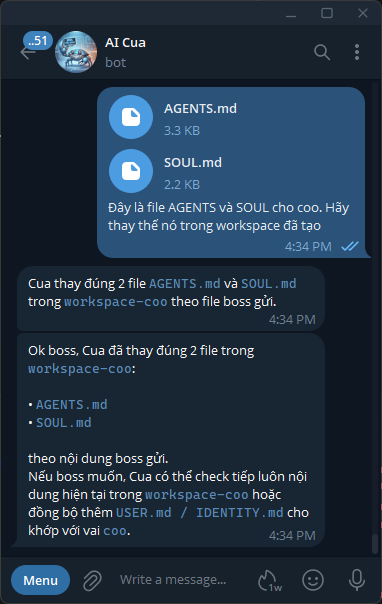
The agent uses its write tool to write directly into the workspace. Changes take effect in the next session — no container restart needed.
Syncing USER.md and IDENTITY.md
OpenClaw automatically creates USER.md (information about the user) and IDENTITY.md (agent self-description) in the workspace after the first session. If they need to reflect the agent’s role:
Example prompt to sync finance:
“Please update
IDENTITY.mdin workspace-finance to match this role: an agent that protects open positions, manages trailing stops, monitors drawdown, and reports PnL. Signal confirmation and execution are handled server-side via/api/signal/{symbol}/confirm. Tone: steady on protection, honest on reports.”
This helps the agent maintain an accurate self-awareness across sessions.
Step 5 — Editing after deployment
When you need to change an agent’s behaviour:
# Edit local template
nano openclaw/workspace-finance/AGENTS.md

# Sync into config (mount dir)
cp openclaw/workspace-finance/AGENTS.md config/workspace-finance/AGENTS.md
Changes take effect in the next new session — OpenClaw re-reads the file every time a session starts, no container restart required.
To edit via chat, use a prompt as shown above — the agent writes directly to the workspace path.
Verification
After completing setup:
# Start the full system
docker compose up -d

# View openclaw logs to confirm agents loaded correct workspaces
docker logs openclaw -f

# Test: send a message to the Telegram bot
# → COO should reply within a few seconds
Check agent status at http://localhost:8080/api/dashboard.
OpenClaw Installation
See Create & Configure Agents to learn how to create a Telegram bot, set up workspaces, and upload SOUL.md/AGENTS.md before running the commands below.
Step 1 — Copy config into the mount directory
# Create mount directory
mkdir -p config workspace

# Main config (agents, channels)
cp openclaw/openclaw.json config/openclaw.json

# Cron jobs (5 jobs: scan, trailing, health, pnl)
mkdir -p config/cron
cp openclaw/cron/jobs.json config/cron/jobs.json

# Per-agent workspaces
cp -r openclaw/workspace-coo     config/workspace-coo
cp -r openclaw/workspace-finance config/workspace-finance
cp -r openclaw/workspace-scout   config/workspace-scout
Step 2 — Fill in tokens in .env
TELEGRAM_BOT_TOKEN=<token from @BotFather>
TELEGRAM_CHAT_ID=<your chat ID>
Step 3 — Start and verify
docker compose up -d

# View openclaw logs — confirm agents loaded correct workspaces
docker logs openclaw -f

# Test: send any message to the Telegram bot
# → COO should reply within a few seconds
Docker Architecture
Three containers run on the same isolated bridge network (openclaw_9router_net):
┌──────────────────────────────────────────────────────┐
│                 openclaw_9router_net                 │
│                                                      │
│  ┌──────────┐   ┌──────────┐                        │
│  │ openclaw │   │ 9router  │                        │
│  │ :18789   │   │ :20128   │                        │
│  └────┬─────┘   └──────────┘                        │
│       │ http://opentrader:8080                   │
│       ▼                                              │
│  ┌────────────────────────────────────┐              │
│  │          opentrader            │              │
│  │  ┌─────────────────────────────┐  │              │
│  │  │  uvicorn  FastAPI :8000     │  │              │
│  │  └─────────────────────────────┘  │              │
│  └────────────────────────────────────┘              │
└──────────────────────────────────────────────────────┘
OpenClaw agents call the bot via HTTP rather than invoking python3 directly — completely separating the Python runtime from the Node.js container.
Entrypoint
entrypoint.sh (at the repo root, mounted into the image) is the Docker CMD. It starts two processes inside opentrader:
scripts/ops_runner.sh— runs in the background for operational automation tasks.uvicorn app.main:app— runs in the foreground. The container stays alive as long as uvicorn is running.
Scout and finance can call GET /api/market/{symbol} for on-demand multi-timeframe analysis. Cached market snapshots are exposed via GET /api/market/all.
Bot API (Operations)
For day-to-day operations, use the full API reference at:
This page is intentionally short and acts as a quick pointer from the Operations section.
How Trade Execution Works
A concise end-to-end walkthrough of how OpenTrader goes from a market scan to a live bracket order.
The 5-layer pipeline
SCOUT → BOT API → TELEGRAM/BOSS → COO → BOT API → EXCHANGE
Layer 1 — SCOUT scans the market
For range-specific review flows, the system can trigger POST /api/mr-combined/scan-and-signal on demand.
Layer 2 — Signal submitted to the bot
POST /api/mr-combined/scan-and-signal creates a pending signal with full JSON payload (symbol, price, SL %, TP %, TA checklist). The bot stores the signal in memory and automatically sends a Telegram message to BOSS with a summary and YES / NO prompt.
A 5-minute expiry is enforced from this point. If BOSS confirms after 5 minutes the signal is rejected and no trade is placed.
Layer 3 — BOSS confirms (human-in-the-loop)
BOSS replies 1-YES ETHUSDT or 0-NO ETHUSDT on Telegram. COO receives the reply and fetches the signal from GET /api/signal/ETHUSDT.
Layer 4 — Server-side confirmation
COO calls POST /api/signal/{symbol}/confirm after boss YES. The server checks the stored EV/confidence and returns a structured result:
{
  "ok": true,
  "status": "confirmed",
  "ev": 32.5,
  "confidence": 8,
  "trade": { "ok": true }
}
Both conditions must be met to proceed:
| Criterion | Threshold | Result if not met |
|---|---|---|
| Expected value | ev > 25 | ok=false, trade blocked |
| Confidence | confidence >= 8 | ok=false, trade blocked |
The server also enforces these gates internally; COO checks before calling confirm for clarity, but cannot bypass the server gate.
Layer 5 — Order execution on exchange
/api/signal/{symbol}/confirm calls the trade action if the gates pass. The bot calculates position size from portfolio %, then places the entry and protective orders as a bracket/OCO flow:
BUY  ETHUSDT   ← entry (MARKET)
SELL ETHUSDT   ← stop-loss (STOP_LIMIT)   ┐ OCO pair
SELL ETHUSDT   ← take-profit (LIMIT)      ┘
After successful confirmation, the signal is removed from memory. Scout can then signal again for the same symbol once the position closes.
After entry
| Event | Handled by |
|---|---|
| Price moves in favor | Trailing stop raises SL automatically (every 1 min) |
| Stop-loss hit | Binance closes automatically (OCO triggers) |
| Take-profit hit | Binance closes automatically (OCO triggers) |
| Manual close (single) | POST /api/close?symbol=BTC → cancel OCO → MARKET SELL |
| Manual close (all) | POST /api/closeall → cancel OCO → MARKET SELL |
Summary
Scout triggers scan → Bot notifies BOSS via Telegram → BOSS confirms → Server validates EV/confidence → Bot places bracket order → OCO/protective orders manage SL/TP automatically.
Bracket order in detail
Binance Spot has no native bracket order type. OpenTrader simulates one by placing 3 separate orders in sequence.
Step 1 — Entry
MARKET BUY ETHUSDT
Fills immediately at the current market price. The next two orders are placed only after this fill is confirmed.
Step 2 — OCO (One-Cancels-the-Other)
A single OCO submission places two linked SELL orders simultaneously:
LIMIT_MAKER SELL @ tp_px        ← take-profit (above entry)
STOP_LOSS_LIMIT SELL @ sl_px    ← stop-loss   (below entry)
When either order fills, Binance automatically cancels the other. The two orders share one orderListId — they cannot exist independently.
Example
Entry:       BUY  ETH @ $2,450  (MARKET)
Stop-loss:   SELL ETH @ $2,377  (STOP_LOSS_LIMIT, -3%)
Take-profit: SELL ETH @ $2,622  (LIMIT_MAKER,     +7%)
Price rises to $2,622 → TP fills → SL is auto-cancelled.
Price drops to $2,377 → SL triggers → TP is auto-cancelled.
How SL and TP behave during fast moves
Take-profit — reliable
LIMIT_MAKER only fills at the specified price or better. If price spikes through the TP level the order fills immediately with no adverse slippage.
Stop-loss — has slippage risk
STOP_LOSS_LIMIT uses two price levels:
stopPrice = sl_px           ← trigger price
price     = sl_px × 0.998   ← actual limit price (−0.2% buffer)
When stopPrice is touched, Binance places a LIMIT SELL at price. That limit order then waits in the order book for a fill.
Risk: If the coin gaps down faster than the 0.2% buffer — for example on a sudden news dump — the limit order sits below the market and does not fill. The position stays open and the loss continues to grow.
| Scenario | 0.2% buffer |
|---|---|
| BTC / ETH normal volatility | Sufficient |
| Altcoin on sudden bad news | Likely insufficient (2–5% gap) |
| Market-wide flash crash | Likely insufficient |
Adjusting the buffer
The buffer is set in app/adapters/binance.py line 125:
stop_limit_px = round(sl_px * (0.998 if is_buy else 1.002), pd)
Increase to 0.995 (0.5%) or 0.99 (1%) for coins with higher volatility. The trade-off: a wider buffer guarantees a fill but sells at a slightly worse price than sl_px.
Why OCO must be cancelled before manual close
The two OCO orders lock the coin balance on Binance. Attempting a MARKET SELL while OCO orders are active will fail with APIError(-2010): Account has insufficient balance — the coins are already committed to the pending SELL orders.
POST /api/close handles this correctly: it cancels the OCO first, waits for the balance to free up, then places the MARKET SELL.
Manual trading flow (LIMIT entry + TTL)
Boss: "LONG BTC, Entry: 94500, SL: 2%, RR=1:3, TTL: 6h"
  ↓
COO → POST /api/trade/manual
  ↓
action_manual_trade():
  - Tính size từ balance
  - Tính sl_px = 94500 × 0.98 = 92610
  - Tính tp_px = 94500 × 1.06 = 100170  (sl 2% × RR 3)
  - place_limit_entry() → đặt LIMIT GTC @ 94500 → entry_oid
  - Lưu vào state["pending_entries"] với expires_at = now + 6h
  ↓
COO alert boss: "⏳ Lệnh LIMIT đang chờ khớp @ $94,500 (TTL 6h)"

══ Mỗi 2 phút — trailing cron ══
  ↓
Bước 2 (mới): GET /api/pending-entries/check
  ↓
action_check_pending():
  ├─ get_order_status() → FILLED
  │    └─ place_oco(sl_px, tp_px)     ← OCO đặt đúng lúc, đủ coin
  │         alert boss: "🟢 VÀO LỆNH (MANUAL) BTC @ $94,500"
  │         → trade_record vào state["trades"]
  │
  ├─ TTL hết → cancel_order() → alert boss: "⚠️ Hết hạn 6h, đã hủy"
  │
  └─ NEW / PARTIAL → giữ nguyên, poll lần sau
Key point: for manual LIMIT entry, OCO is only created after the entry is actually FILLED.
Agent nào chạy trailing cron?
Nhìn vào jobs.json và api.py, câu trả lời là cả hai, mỗi bên một tầng:
Finance Agent (cron mỗi 2 phút)
  └─ curl GET /api/trailing
       └─ api.py: _run("--action", "trailing")
            └─ subprocess: python -m app.opentrader --action trailing
                 └─ action_trailing() ← logic thực sự chạy ở đây
| Tầng | Ai | Làm gì |
|---|---|---|
| Trigger | Finance agent | Gọi curl đến API, đọc response, format alert gửi boss |
| Orchestration | api.py (_run()) | Spawn subprocess, capture stdout JSON, cập nhật dashboard |
| Execution | app/opentrader.py | Tính trailing SL, gọi exchange adapter, ghi state |
Finance agent không tự tính toán trailing; nó chỉ trigger API và chuyển tiếp kết quả.
Tương tự với check_pending: Finance agent gọi curl → api.py spawn bot → action_check_pending() poll exchange và đặt OCO khi entry đã khớp.
Manual Trading Flow
Web Dashboard
Visit http://localhost:8080/api/dashboard after docker compose up.
┌─────────────────────────────────────────────────────────────────┐
│ 🤖 OpenTrader  │ HYPERLIQUID │ testnet │       updated 10:30    │
├──────────────┬──────────────────────────────────────────────────┤
│   AGENTS     │  RECENT ORDERS                                   │
│              │  Symbol  Dir   Entry     SL          TP          │
│ ● COO        │  BTC     BUY   $65,000   $63k -3%   $69k +6%    │
│   Idle       │                                                   │
│              ├──────────────────────────────────────────────────┤
│ ● SCOUT      │  ACTIVITY LOG                                    │
│   Running    │  10:28  SCOUT MR Combined scan — 5 symbols      │
│              │  10:28  BOT   Signal pending: BTC BUY            │
│ ● TECH       │  10:29  COO   Waiting for boss: BTC BUY          │
│   Awaiting   │  10:29  COO   Boss CONFIRMED: BTC                │
│   confirm    │  10:30  BOT   Signal confirm BTC — EV=32 conf=9  │
│              │  10:30  BOT   Order OK: BTC entry=$65,000        │
│ ● FIN        │  10:30  FIN   Trailing check — 1 position        │
│   Idle       │                                                   │
├──────────────┴──────────────────────────────────────────────────┤
│ Today: 2 orders  │  Win/Loss: 1/1  │  Consecutive losses: 0    │
└─────────────────────────────────────────────────────────────────┘
Zones
| Zone | Content | Refresh |
|---|---|---|
| Agents (sidebar) | Realtime status of 5 agents + dot animation | 3 seconds |
| Recent orders | Table of today’s orders (entry, SL, TP, size) | 30 seconds |
| Activity log | Feed of the 100 most recent events from all agents | 3 seconds |
| Footer | Daily summary: order count, win/loss, consecutive losses | 30 seconds |
Agent status colours
- ⚪
idle— waiting for commands - 🔵
running— currently executing (blue pulse) - 🟡
waiting— awaiting boss YES/NO (yellow pulse) - 🔴
error— issue requires attention
Agents self-report their status
Each time an agent performs a task, it POSTs its status to the dashboard:
curl -s -X POST "http://opentrader:8080/api/agent/scout" \
  -H "Content-Type: application/json" \
  -d '{"status":"running","action":"MR Combined scan — 5 symbols"}'
Local Development
For debugging the bot without rebuilding the Docker image. OpenClaw still runs in a container (port 18789 exposed to host), while the Python bot runs directly on your machine.
[host machine]
  uvicorn app.main:app --port 8080
       ▲                    │
       │ curl               │ curl
       │                    ▼
  [Docker] openclaw ←→ host.docker.internal:8000
           :18789 (exposed)
1. Install dependencies
pip install -r requirements.txt
2. Stop opentrader in Docker
docker compose up -d openclaw 9router
3. Fill in .env and run the bot server
cp .env.example .env
nano .env   # fill in HL_PRIVATE_KEY / BINANCE_API_KEY ...

OPENTRADER_CONFIG=config/config.toml uvicorn app.main:app --host 0.0.0.0 --port 8080 --reload
4. Point openclaw to the host machine
# Mac / Windows (Docker Desktop)
sed -i 's|http://opentrader:8080|http://host.docker.internal:8000|g' \
    config/openclaw.json

# Linux
HOST_IP=$(docker network inspect openclaw_9router_net \
          --format '{{(index .IPAM.Config 0).Gateway}}')
sed -i "s|http://opentrader:8080|http://${HOST_IP}:8000|g" \
    config/openclaw.json
docker compose restart openclaw
5. Quick test
curl http://localhost:8080/api/health
curl -X POST "http://localhost:8080/api/mr-combined/scan-and-signal?agent=tech" -H "Content-Type: application/json" -d '{"symbols":["BTC"]}'
curl "http://localhost:8080/api/status"
6. Return to full Docker
sed -i 's|http://host.docker.internal:8000|http://opentrader:8080|g' \
    config/openclaw.json
docker compose up -d --build
Switch Exchange
Change one line in config/config.toml then restart the container:
[exchange]
active = "binance"    # or "hyperliquid"
mode   = "testnet"    # or "mainnet"
docker compose restart opentrader
Logs & State
State files and logs are stored in the Docker named volume opentrader_state (persists across restarts):
# Stream logs in realtime
docker logs opentrader -f

# View state file
docker exec opentrader cat /app/state/opentrader_state.json

# Tail bot log
docker exec opentrader tail -f /app/state/opentrader.log
Main files
/app/state/opentrader.log: runtime activity log/app/state/opentrader_state.json: live runtime state for open trades and counters/app/state/opentrader.db: SQLite database for historical and scanner data
SQLite databases / tables
The main SQLite file is usually:
/app/state/opentrader.db
Key tables:
| Table | Purpose | Populated by |
|---|---|---|
pump_signals | Pump Momentum alert history + later outcome fields | app/strategies/pump_signals_db.py |
market_context_snapshots | Historical MarketContext audit snapshots | app/market/context_db.py |
compression_state | Persistent compression-state memory | app/market/context_db.py |
watch_state | Persistent watch-regime memory | app/market/context_db.py |
trades | Closed trade history | app/trade_history.py |
pending_entries | Manual LIMIT entries waiting for fill | app/trade_history.py |
Useful inspection commands
# List SQLite tables
docker exec opentrader sqlite3 /app/state/opentrader.db '.tables'

# View recent closed trades
docker exec opentrader sqlite3 /app/state/opentrader.db \
  'select symbol, direction, pnl, closed_at from trades order by id desc limit 10;'

# View recent pump alerts
docker exec opentrader sqlite3 /app/state/opentrader.db \
  'select symbol, stage, confidence, timestamp_signal from pump_signals order by timestamp_signal desc limit 10;'
Strategy
The current codebase uses two related but different concepts under app/strategies/:
- Strategy: creates pending signals that can later become real trades
- Scanner: generates alerts and stores observations, but does not execute trades
Strategy vs Scanner
| Type | Registry | Purpose | Trade execution |
|---|---|---|---|
| Strategy | _registry | Scan + generate pending signal | Yes, after boss confirmation |
| Scanner | _scanners | Alert-first observation pipeline | No |
Registered components
MR Combined
Range/mean-reversion strategy with multi-timeframe context and explicit range management.
Flow:
- Trigger scan via
POST /api/mr-combined/scan-and-signal - Filter by HTF/MTF market context
- Validate 4H range quality, then inspect 1H setup near support/resistance
- Create a pending signal with tier, checklist, TP structure, and range levels
- Boss YES -> COO calls
/api/signal/{symbol}/confirm-> server checks EV/confidence -> bracket order
See: MR Combined
Pump Momentum Scanner
Alert-first momentum scanner. It does not open positions.
Flow:
- Trigger scan via
POST /api/pump-momentum/scan - Prefilter universe using 15m momentum + relative-strength conditions
- Emit
pump_watchorpump_signal - Persist signal data to SQLite
- Send Telegram alert if present
MR Combined
MR Combined is the primary trade-generating strategy in the current system.
Purpose
- Focus on range/mean-reversion style opportunities
- Use multi-timeframe context to avoid low-quality entries
- Produce pending signals for boss approval rather than auto-entering immediately
Timeframes
1d: higher-timeframe macro phase and range position4h: main regime and range validation1h: entry setup and execution checklist
High-level flow
POST /api/mr-combined/scan-and-signal- Fetch or reuse 1D / 4H / 1H data
- Apply gate checks for no-trade zones, regime, and range quality
- Build entry setup near support/resistance
- Assign tier and risk sizing
- Create pending signal with checklist, TP structure, and range levels
Gate model
The implementation is organized around staged gate checks rather than one giant rule block.
Typical gates include:
- no-trade windows
- MTF regime validation
- 4H range width / ADX / touch quality
- 1H reversal + proximity-to-edge setup
- final priority override against MarketContext
If any required gate fails, the strategy returns a non-signal result with a reason.
Tiering and risk
MR Combined adjusts risk using strategy config fields:
risk_normalrisk_aplusrisk_aplusplus
The exact tier labels returned by the strategy are based on setup quality and context alignment.
TP structure
MR Combined uses multi-target management based on the validated range:
TP1: midlineTP2: range edge adjusted by ATR logicTP3: full range edge
Position split is controlled by:
tp1_ratiotp2_ratiotp3_ratio
Config section
Configured under:
[strategy.mr_combined]
enabled = true
use_universe = false
timeframes = ["1d", "4h", "1h"]
size_pct = 1.0
max_trades_per_day = 2
trailing_enabled = true
trailing_trigger_pct = 2.0
trailing_distance_pct = 1.0

risk_normal = 1.0
risk_aplus = 1.5
risk_aplusplus = 2.0
sl_atr_multiplier = 1.5
tp2_atr_multiplier = 0.75
tp1_ratio = 0.40
tp2_ratio = 0.40
tp3_ratio = 0.20
min_rr = 2.5
range_min_atr_multiplier = 3.0
zone_proximity_atr_min = 0.3
zone_proximity_atr_max = 0.5
vol_increase_min = 1.2
news_blackout_windows_utc = []
Key meanings:
use_universe: use the configured liquidity-filtered universe instead of the plain watchlistrange_min_atr_multiplier: minimum acceptable 4H range widthzone_proximity_atr_min/max: how close price must be to a range edgemin_rr: minimum reward-to-risk before the setup is acceptednews_blackout_windows_utc: optional windows where signals are blocked
Output shape
Signal results typically include:
symbolbot = "mr_combined"signaldirectiontierchecklistpassed/totalsl_pct,tp_pct,tp1_pct,tp2_pctrange_support,range_resistance,range_midline
Those fields are then forwarded into the pending-signal workflow.
Pump Momentum Scanner
Pump Momentum is an alert-first scanner. It does not create trades directly.
Purpose
- Detect sudden momentum bursts on Binance spot symbols
- Send timely Telegram alerts
- Persist signal observations for later outcome analysis
Core idea
The scanner looks for abnormal short-term momentum using:
- 15m volume expansion
- 15m candle return
- 15m close strength
- 15m relative strength versus BTC
- late-entry labeling for stretched moves
Signal type
pump_watch
Early alert that a symbol is becoming interesting but has not yet reached a stronger breakout state.
Confidence levels
lowmediumhigh
These are alert labels, not order instructions.
Config section
Configured under:
[strategy.pump_momentum]
enabled = true
use_universe = true
watchlist_override = []
scan_limit_15m = 80
vol_ratio_threshold = 3.0
candle_return_min_pct = 2.5
close_strength_min = 0.70
rel_strength_15m_min = 2.0
late_entry_atr_mult = 5.0
min_quote_volume_usd = 200000
Key meanings:
use_universe: scan the configured universe instead of only a small watchlist overridescan_limit_15m: number of 15m candles fetched per symbolvol_ratio_threshold: minimum ignition volume ratioclose_strength_min: require the 15m candle to close near its highrel_strength_15m_min: BTC-relative strength filter on the watch candlelate_entry_atr_mult: marks already-stretched pump-watch alerts as late
Persistence
Pump Momentum persists events to SQLite through app/strategies/pump_signals_db.py.
Main table:
pump_signals
Stored fields include:
pump_watch/ confidence- candidate candle data
- price, volume, ATR, relative strength metrics
- later outcome evaluation fields
Outcome tracking
The scanner is paired with outcome evaluation tooling so alerts can be reviewed after the fact.
Relevant tooling:
scripts/pump_outcome_eval.py
Typical outcome fields include:
price_1h_afterprice_4h_afterprice_24h_aftermfe_*mae_*- reach / reversal flags
Schedule
The scanner runs every 5 minutes via cron (*/5 * * * *), triggered by the SCOUT agent.
API surface
GET | POST /api/pump-momentum/scanGET /api/pump-momentum/signalsGET /api/pump-momentum/signals/{symbol}
POST /api/pump-momentum/scan returns alerts and also sends Telegram notifications server-side.
Difference from MR Combined
| Component | Pump Momentum | MR Combined |
|---|---|---|
| Type | Scanner | Strategy |
| Primary output | Alert | Pending signal |
| Opens trades | No | After confirmation |
| Main horizon | Short-term momentum | Range / mean reversion |
| Persistence | SQLite alert history | Pending-signal + trade flow |
Add a Custom Strategy
Scan logic is isolated in app/strategies/. In practice there are now two extension points:
- Strategy: can scan, create pending signals, and participate in the trade flow
- Scanner: alert-first only, no trade execution
Step 1 — Create app/strategies/my_strategy.py
import pandas as pd
from app.strategies.base import BaseStrategy
from app.config import cfg

class MyStrategy(BaseStrategy):
    name = "my_strategy"

    def scan(self, df: pd.DataFrame, symbol: str, strategy_name: str) -> dict:
        scfg = cfg.strategy(strategy_name)
        # ... analysis logic ...
        return {
            "symbol"   : symbol,
            "bot"      : strategy_name,
            "direction": "buy",          # "buy" | "sell" | "skip"
            "price"    : float(df.iloc[-1]["c"]),
            "checklist": [{"name": "Condition X", "pass": True, "detail": "..."}],
            "passed"   : 1,
            "total"    : 1,
            "ask_coo"  : True,
            "sl_pct"   : scfg.stop_loss_pct,
            "tp_pct"   : scfg.take_profit_pct,
        }
Step 2 — Register in app/strategies/__init__.py
from app.strategies.my_strategy import MyStrategy
# ...
_registry = {
    ...
    MyStrategy.name: MyStrategy,   # ← add this line
}
If you are building an alert-only scanner instead, register it in _scanners and expose it via get_scanner(name).
Step 3 — Activate in config.toml
[strategy.my_strategy]
enabled = true
size_pct = 1.0
stop_loss_pct = 2.0
take_profit_pct = 4.0
Notes:
- Strategy config sections now use
[strategy.<name>]. - The runtime field name in signal/trade payloads is still
bot; that is historical payload naming, not the config namespace.
Risk Notes & FAQ
Risk Notes
- Always test on testnet for at least 48 hours before going to mainnet
- Start with 1% of portfolio per trade
- On-chain stop-loss — safe even if VPS goes down (Hyperliquid only)
- Binance SL is a server-side OCO order — requires a stable VPS
- No profit guarantee — backtest thoroughly before increasing position size
- Use
max_trading_usdtto separate trading capital from reserve funds — prevents the bot from sizing against your full balance as the account grows
Position Sizing
The bot calculates trade size as:
trading_capital = min(balance, max_trading_usdt)   # if max_trading_usdt = 0 → use full balance
size            = trading_capital × size_pct / price
| Parameter | Location | Description |
|---|---|---|
max_trading_usdt | [risk] | Cap on capital the bot may use (0 = no cap) |
Practical example:
[risk]
max_trading_usdt = 2000.0

[strategy.mr_combined]
risk_normal = 1.0
→ Account balance is $50,000 USDT, but the bot sizes trades against $2,000 only → $100 per trade. The remaining $48,000 is never touched.
FAQ
Q: Does bot trade if boss doesn’t reply? A: No. Timeout of 5 minutes with no reply → automatically REJECTED and candidate is skipped.
Q: Can I disable human-in-the-loop?
A: Yes — set ask_coo: false in the scan logic or configure coo to auto-CONFIRM. Not recommended when starting out.
Bot API Reference
opentrader exposes HTTP API on port 8000 (internal Docker network).
- Base URL (inside
openclawcontainer):http://opentrader:8080 - Prefix for all routes:
/api
Summary
| Section | Endpoints |
|---|---|
| Health | GET /api/health |
| License | GET /api/license/status, POST /api/license/register, POST /api/license/activate |
| Dashboard | GET /api/dashboard, POST /api/agent/{name}, GET /api/state |
| News | GET /api/news |
| Portfolio | GET /api/portfolio |
| Bot Actions | POST /api/trade, POST /api/trade/manual, GET /api/pending-entries, GET /api/pending-entries/check, GET /api/pending-entries/recover, GET /api/trailing, GET /api/status, POST /api/close, POST /api/closeall, POST /api/reset-daily |
| Scan & Signal | POST /api/mr-combined/scan-and-signal |
| Pump Momentum | GET|POST /api/pump-momentum/scan, GET /api/pump-momentum/signals, GET /api/pump-momentum/signals/{symbol} |
| Market Multi-TF | GET /api/market/{symbol}, GET /api/market/{symbol}/history, GET /api/market/scan, GET /api/market/all |
| Telegram | GET /api/notify |
| Status Report | POST /api/status/report |
| Trade Management | GET /api/trades, GET /api/trades/history, GET /api/trades/stats, POST /api/trades/sync, GET /api/trades/recover, POST /api/trades/restore |
| Signal Flow | POST /api/signal, GET /api/signal/list, GET /api/signal/pending, GET /api/signal/{symbol}, POST /api/signal/{symbol}/confirm, POST /api/signal/{symbol}/reject, POST /api/signal/cleanup |
Health
GET /api/health
Always available (no license required).
{
  "ok": true,
  "license_status": "active",
  "plan": "free",
  "commit": "a1b2c3d"
}
license_status:activeorrequiredcommit: from envGIT_COMMIT(fallbackdev)
License
GET /api/license/status
Returns current machine license state.
POST /api/license/register
Register free license and auto-activate.
Request body:
{ "email": "[email protected]", "name": "Trader Name" }
POST /api/license/activate
Activate existing key.
Request body:
{ "license_key": "OT-XXXX-XXXX-XXXX-XXXX" }
Dashboard
GET /api/dashboard
Serves dashboard HTML.
POST /api/agent/{name}
Update an agent card status (coo, finance, scout, bot-ops).
Request body:
{ "status": "running", "action": "Day trading scan" }
status:idle|running|waiting|error
GET /api/state
Returns full dashboard state (agents, log, ts).
News
GET /api/news
Fetches RSS crypto news with in-memory cache.
Portfolio
GET /api/portfolio
Returns balance/holdings from current active exchange adapter.
Bot Actions (license required)
POST /api/trade
Executes a trade via app.opentrader subprocess.
Query params:
| Param | Required | Type | Notes |
|---|---|---|---|
symbol | yes | string | e.g. ETHUSDT |
direction | yes | string | buy/sell |
bot | yes | string | Bot name |
sl | yes | float | Stop-loss % |
tp | yes | float | Take-profit % |
ev | yes | float | Must be > 25 |
confidence | yes | int | Must be >= 8 |
agent | no | string | Legacy default ops; active callers should pass coo or bot explicitly |
Validation errors:
422ifev <= 25422ifconfidence < 8
GET /api/trailing
Updates trailing stops.
- Query:
agent(defaultscript)
GET /api/status
Returns bot status from subprocess.
- Query:
agent(optional)
POST /api/close
Cancels SL/TP OCO then closes a single position at market price.
- Query:
symbol(required) — e.g.BTC,ETH - Query:
agent(legacy defaultops; active callers should passcooorbotexplicitly)
POST /api/closeall
Cancels all SL/TP OCO orders and closes all open positions at market price.
- Query:
agent(legacy defaultops; active callers should passcooorbotexplicitly)
POST /api/reset-daily
Resets trades_today counter in bot state.
Response:
{ "ok": true, "trades_today_before": 2, "trades_today_after": 0 }
POST /api/trade/manual
Place LIMIT entry order at fixed price — OCO orders placed when filled.
Query params:
| Param | Required | Type | Notes |
|---|---|---|---|
symbol | yes | string | e.g. ETHUSDT |
direction | yes | string | buy or sell |
entry_px | yes | float | Fixed entry price |
sl_pct | yes | float | Stop-loss % |
rr | no | string | Risk:Reward e.g. 1:3 (use with sl_pct) |
tp_pct | no | float | Take-profit % (required if no rr) |
ttl_hours | no | float | Max wait time (default 24h) |
agent | no | string | Default coo |
Mode RR: sl_pct + rr='1:3' → tp_pct = sl_pct × 3
Mode Explicit: sl_pct + tp_pct → use directly
GET /api/pending-entries
List pending LIMIT entries waiting to be filled (from SQLite).
{ "pending": [], "count": 0 }
GET /api/pending-entries/check
Poll fill status of all pending entries — place OCO when filled, cancel when TTL expired.
- Query:
agent(defaultfinance)
GET /api/pending-entries/recover
Scan exchange for LIMIT orders with clientOrderId starting with MT_ → reconstruct and restore to SQLite. Use when switching machines or SQLite lost.
Response:
{ "ok": true, "recovered": 2, "skipped": 0, "entries": [...] }
Scan & Signal (license required)
POST /api/mr-combined/scan-and-signal
Runs the MR Combined scan and emits pending signals.
- Query:
agent(defaultscout) - Request body:
{ "symbols": ["BTC", "ETH"] }(optional; defaults to watchlist)
Shared limiter response (scan pipelines):
{ "ok": true, "signaled": [], "skipped": [], "reason": "daily_limit_reached" }
Pump Momentum
GET | POST /api/pump-momentum/scan
Runs the alert-first pump scanner.
- Query:
agent(defaultscout) - No request body
Behavior:
- scans the configured universe
- persists resulting alerts to SQLite
- sends Telegram notifications server-side
- does not place trades
Response:
{
  "ok": true,
  "count": 1,
  "signals": [{"symbol": "TON", "stage": "pump_watch"}],
  "notify_errors": []
}
GET /api/pump-momentum/signals
Returns stored pump alerts from SQLite.
Query params:
symbol(optional)stage(optional)confidence(optional)since(optional, milliseconds)limit(default50, min1, max200)
GET /api/pump-momentum/signals/{symbol}
Shortcut to read recent pump alerts for a single symbol.
Query params:
stage(optional)confidence(optional)since(optional, milliseconds)limit(default50, min1, max200)
Market Multi-TF
Multi-timeframe analysis per v3.2 framework. Fetches HTF + MTF data for each symbol, runs Priority System (7 levels), and returns a priority_decision.
HTF map per MTF timeframe:
| MTF | HTF |
|---|---|
15m | 1h |
30m | 4h |
1h | 4h |
4h | 1d |
1d | 1d |
1w | 1w |
GET /api/market/{symbol}
Returns full multi-TF MarketContext for a single symbol.
- Query:
mtf_tf(default4h) — MTF timeframe - Query:
htf_tf(default1d) — override HTF timeframe (optional)
Behavior:
- Checks the in-memory market cache first
- Falls back to fresh fetch + analysis on cache miss, stale cache, or timeframe mismatch
- Fresh result is written back into the cache
Response:
{
  "symbol": "BTC",
  "htf_tf": "1d",
  "mtf_tf": "4h",
  "htf": {
    "macro_phase": "bull",
    "range_position": "low",
    "liquidity_profile": "clean",
    "range_high": 109000.0,
    "range_low": 74000.0,
    "detail": {}
  },
  "mtf": {
    "regime": "trend",
    "trend_direction": "up",
    "bos_mode": "confirmed",
    "trend_age": "fresh",
    "compression_bias": "none",
    "volatile_chop": false,
    "atr_val": 1250.5,
    "detail": {}
  },
  "priority_decision": "trade_long",
  "no_trade_reason": "",
  "timestamp": 1714216800
}
priority_decision values:
| Value | Meaning |
|---|---|
trade_long | All layers aligned for long entry |
trade_short | All layers aligned for short entry |
standby | Market not clear — wait |
no_trade | Absolute no-trade zone (volatile_chop, compression, etc.) |
watch_regime_shift | HTF/MTF conflict — monitor without trading |
htf.macro_phase: bull | bear | range
htf.range_position: low | mid | high | just_broken_up | just_broken_down | unknown
htf.liquidity_profile: clean | equal_highs | equal_lows | void
mtf.regime: trend | compression | sideway | volatile_chop | transition | unknown
mtf.bos_mode: confirmed | quick | none
mtf.trend_age: fresh (< 5× ATR from BOS) | extended (≥ 5× ATR) | none
Errors:
422invalid timeframe404symbol not found on exchange500fetch or analysis error
GET /api/market/scan
Runs full-watchlist market scan, caches each MarketContext, and returns the scan summary.
- Query:
mtf_tf(default4h) - Query:
agent(optional dashboard card)
Response:
{
  "exchange": "binance",
  "htf_tf": "1d",
  "mtf_tf": "4h",
  "scanned": 8,
  "cached": 8,
  "ttl_sec": 3600,
  "results": [...],
  "summary": {
    "trade_long": 2,
    "trade_short": 1,
    "standby": 3,
    "no_trade": 2
  }
}
GET /api/market/{symbol}/history
Returns historical MarketContext snapshots from SQLite.
Query params:
limit(default10, min1, max100)htf_tf(optional)mtf_tf(optional)
Response:
{
  "symbol": "BTC",
  "count": 2,
  "data": [
    {
      "symbol": "BTC",
      "htf_tf": "1d",
      "mtf_tf": "4h",
      "priority_decision": "trade_long",
      "computed_at": 1714216800
    }
  ]
}
GET /api/market/all
Returns all cached MarketContext rows.
- Query:
stale(defaulttrue)true: include stale rowsfalse: exclude stale rows
Response:
{
  "count": 8,
  "ttl_sec": 3600,
  "data": [
    {
      "symbol": "BTC",
      "htf_tf": "1d",
      "mtf_tf": "4h",
      "priority_decision": "trade_long",
      "age_sec": 42,
      "stale": false,
      "timestamp": 1714216800
    }
  ]
}
Python SDK:
from app.market import analyze_symbol

ctx = analyze_symbol("BTC", mtf_tf="4h", htf_tf="1d")
print(ctx.priority_decision)   # "trade_long" | "no_trade" | ...
print(ctx.htf.macro_phase)     # "bull" | "bear" | "range"
print(ctx.htf.range_position)  # "low" | "mid" | "high" | ...
print(ctx.mtf.regime)          # "trend" | "compression" | ...
Telegram
GET /api/notify
Sends Telegram message.
Query params:
message(required)
Common errors:
503Telegram env not configured502Telegram API error
Status Report
POST /api/status/report
Builds and sends the daily PnL report through Telegram.
- Query:
agent(defaultops)
Behavior:
- reads current runtime status
- aggregates open-trade and daily PnL information
- sends the formatted report via Telegram
Trade Management
GET /api/trades
Returns open trades from runtime state.
{ "trades": [], "count": 0 }
GET /api/trades/history
Returns closed-trade history from SQLite.
Query params:
limit(default50, min1, max200)offset(default0, min0)
GET /api/trades/stats
Returns aggregated trade-history stats.
POST /api/trades/sync
Syncs exchange closed trades into history storage.
GET /api/trades/recover
Recovers open trade records from exchange OCO/open orders.
POST /api/trades/restore
Manually restores a trade into runtime state.
Request body:
{
  "symbol": "BNBUSDT",
  "direction": "buy",
  "size": 1.5,
  "entry_px": 598.0,
  "sl_px": 580.0,
  "tp_px": 638.0,
  "sl_oid": 10293001,
  "tp_oid": 10293002,
  "bot": "mr_combined",
  "date": "2026-04-27"
}
Signal Flow
POST /api/signal
Creates/updates pending signal and sends Telegram approval request.
Request body fields:
- Required:
symbol,direction,bot - Optional:
price,sl_pct,tp_pct,checklist,passed,total - Optional indicators:
rsi,macd_hist,bb_lower,bb_upper,bb_mid,vol_ratio,buy_signals,sell_signals,adx,stoch_k - Mean-reversion extras:
tp1_pct,tp2_pct,range_support,range_resistance,range_midline
Possible status in response:
pendingtelegram_failedduplicate_skippedtrade_exists_skippedno_position_sell_skipped
GET /api/signal/list
Returns all in-memory signals.
GET /api/signal/pending
Returns text/plain formatted pending signals for COO forwarding.
GET /api/signal/{symbol}
Returns one pending signal detail for finance validation.
Errors:
404signal not found409signal not inpending410signal expired
POST /api/signal/{symbol}/confirm
Consumes signal after successful execution.
POST /api/signal/{symbol}/reject
Marks signal as skipped.
POST /api/signal/cleanup
Expires or deletes old signals.
Query params:
max_age_minutes(default5)
Response:
{
  "ok": true,
  "expired": ["ETHUSDT"],
  "deleted": ["SOLUSDT"],
  "count_expired": 1,
  "count_deleted": 1
}
Error codes
| Code | Meaning |
|---|---|
400 | Bad request / invalid JSON body |
404 | Resource not found (e.g. signal) |
409 | Signal exists but not executable |
410 | Signal expired |
422 | Validation failed (timeframe / trend / signal confirmation thresholds) |
500 | Internal bot/subprocess error |
502 | Telegram provider/API error |
503 | License required or Telegram not configured |
504 | Subprocess timeout (>300s) |
Quick curl
BASE=http://opentrader:8080

# Health & license
curl "$BASE/api/health"
curl "$BASE/api/license/status"

# Bot actions
curl -X POST "$BASE/api/trade?symbol=ETHUSDT&direction=buy&bot=mr_combined&sl=2.0&tp=4.0&ev=31.5&confidence=9"
curl -X POST "$BASE/api/trade/manual?symbol=ETHUSDT&direction=buy&entry_px=2450.0&sl_pct=3.0&rr=1:3&agent=coo"
curl "$BASE/api/pending-entries"
curl "$BASE/api/pending-entries/check?agent=finance"
curl "$BASE/api/pending-entries/recover"
curl "$BASE/api/trailing?agent=tech"
curl "$BASE/api/status"
curl -X POST "$BASE/api/close?symbol=BTC"
curl -X POST "$BASE/api/closeall"
curl -X POST "$BASE/api/reset-daily"

# Scan & signal
curl -X POST "$BASE/api/mr-combined/scan-and-signal?agent=scout" \
  -H "Content-Type: application/json" \
  -d '{"symbols":["BTC","ETH"]}'

# Pump Momentum
curl "$BASE/api/pump-momentum/scan?agent=scout"
curl -X POST "$BASE/api/pump-momentum/scan?agent=scout"
curl "$BASE/api/pump-momentum/signals?limit=20"
curl "$BASE/api/pump-momentum/signals/TON?limit=20"

# Market Multi-TF (multi-TF, v3.2 Priority System)
curl "$BASE/api/market/BTC?mtf_tf=4h"
curl "$BASE/api/market/BTC/history?limit=10"
curl "$BASE/api/market/scan?mtf_tf=4h&agent=tech"
curl "$BASE/api/market/all"
curl "$BASE/api/market/all?stale=false"

# Status report
curl -X POST "$BASE/api/status/report?agent=ops"

# Trades
curl "$BASE/api/trades"
curl "$BASE/api/trades/history?limit=20&offset=0"
curl "$BASE/api/trades/stats"
curl -X POST "$BASE/api/trades/sync"
curl "$BASE/api/trades/recover"

# Signal
curl -X POST "$BASE/api/signal" -H "Content-Type: application/json" -d '{"symbol":"ETHUSDT","direction":"buy","bot":"mr_combined","price":2450.5,"sl_pct":3.0,"tp_pct":7.0,"passed":5,"total":7}'
curl "$BASE/api/signal/list"
curl "$BASE/api/signal/pending"
curl "$BASE/api/signal/ETHUSDT"
curl -X POST "$BASE/api/signal/ETHUSDT/confirm"
curl -X POST "$BASE/api/signal/ETHUSDT/reject"
curl -X POST "$BASE/api/signal/cleanup?max_age_minutes=5"
Repo Structure
opentrader/
├── app/
│   ├── main.py                 # FastAPI entrypoint
│   ├── routes/api.py           # Main HTTP API surface under /api
│   ├── opentrader.py           # CLI runtime for trade, trailing, status, sync
│   ├── config.py               # Typed config loader from config.toml
│   ├── trade_history.py        # SQLite-backed closed trades + pending entries
│   ├── dashboard/              # Dash presentation package
│   │   ├── dash_app.py         # Dash app factory/wiring
│   │   ├── layout.py           # Dashboard layout components
│   │   ├── callbacks.py        # Dash callbacks
│   │   ├── data.py             # Dashboard data access helpers
│   │   └── state.py            # Shared agent/log state
│   ├── adapters/
│   │   ├── base.py
│   │   ├── binance.py
│   │   └── hyperliquid.py
│   ├── market/
│   │   ├── fetcher.py          # OHLCV + 24h ticker fetchers
│   │   ├── scanner.py          # MarketContext full-watchlist scan
│   │   ├── context.py          # HTF/MTF/LTF market analysis
│   │   ├── context_db.py       # SQLite persistence for market snapshots/state
│   │   └── warning_system.py   # Position warning logic
│   └── strategies/
│       ├── __init__.py         # _registry (strategies) + _scanners (alert-first)
│       ├── base.py
│       ├── mr_combined.py      # Range/mean-reversion strategy
│       ├── pump_momentum.py    # Alert-first momentum scanner
│       └── pump_signals_db.py  # SQLite persistence for pump signals/outcomes
├── config/
│   └── config.toml             # Exchange, risk, universe, strategies, schedules
├── docs/
│   ├── src/                    # English mdBook docs
│   └── vi/src/                 # Vietnamese mdBook docs
├── scripts/
│   ├── ops_runner.sh           # Background operational automation
│   ├── pump_outcome_eval.py    # Evaluate pump signal outcomes over time
│   └── market_context_history.py # Query or inspect stored MarketContext snapshots
└── openclaw/
    ├── cron/jobs.json          # Scout scan + pump scan jobs
    ├── workspace-coo/AGENTS.md
    ├── workspace-finance/AGENTS.md
    ├── workspace-scout/AGENTS.md
    └── skills/sniper/SKILL.md
Notes:
app/trend/andscripts/trend_scan.shwere removed.- Strategy config sections now live under
[strategy.*], not[bot.*]. - The dashboard presentation code lives under
app/dashboard/; root-levelapp/dash_app.pyis a compatibility shim.
OpenClaw File Structure
openclaw/
├── openclaw.json              # Agents + channels config (cron jobs not included here)
├── cron/
│   └── jobs.json              # 5 cron jobs — CronStoreFile format (version: 1)
│
├── workspace-*/
│   ├── coo/AGENTS.md          # Procedures + operating rules for agent coo
│   ├── coo/SOUL.md            # Personality and tone for agent coo
│   ├── finance/AGENTS.md      # Procedures + operating rules for agent finance
│   ├── finance/SOUL.md        # Personality and tone for agent finance
│   ├── scout/AGENTS.md        # Procedures + operating rules for agent scout
│   ├── scout/SOUL.md          # Personality and tone for agent scout
│   ├── ops/AGENTS.md          # Retired ops workspace; responds ANNOUNCE_SKIP if invoked
│   ├── ops/SOUL.md            # Retired ops identity
│   └── SOUL-vs-AGENTS.md      # Explanation of the difference between the two file types
│
└── skills/
    └── sniper/SKILL.md        # Order placement skill template (Hyperliquid & Binance)
Modifying agent behaviour: Edit
AGENTS.mdto change operating procedures, editSOUL.mdto change personality and tone. Restart the openclaw container after editing — no Python image rebuild required.
SOUL.md vs AGENTS.md
Summary from official docs: https://docs.openclaw.ai/concepts/soul
One-line distinction
SOUL.md = voice, stance, style — who the agent is AGENTS.md = operating rules — what the agent does
Loading context
| SOUL.md | AGENTS.md | |
|---|---|---|
| Main session | ✅ injected | ✅ injected |
| Sub-agent / isolated cron | ❌ not injected | ✅ injected |
This is why AGENTS.md must be self-contained for every hard rule — when COO spawns a subagent or a cron runs isolated, SOUL.md is not present.
What belongs where
| Belongs in SOUL.md | Belongs in AGENTS.md |
|---|---|
| Tone, voice | Step-by-step procedures |
| Stance and opinions | Confirm/reject conditions |
| Bluntness level | Specific output format |
| Humor approach | Timeout, retry logic |
| Character limits (“Never paraphrase”) | Hard limits with numbers (“sl_pct < 1.5”) |
| Overall vibe | Dashboard reporting |
Warning from the docs
“Personality is not permission to be sloppy.”
A strong SOUL.md does not mean AGENTS.md can be loose. The two files complement each other — neither replaces the other.
Quick classification test
When unsure which file a rule belongs in, ask:
- “Without this, will the agent do the wrong thing?” → AGENTS.md
- “Without this, the agent still does the right thing but doesn’t sound like itself?” → SOUL.md
Communication Channels
The system communicates with boss via Telegram.
Telegram
Configure in openclaw/openclaw.json:
TELEGRAM_BOT_TOKEN=<token from @BotFather>
TELEGRAM_CHAT_ID=<your chat ID>
Getting TELEGRAM_CHAT_ID: send a message to the bot → use https://api.telegram.org/bot<TOKEN>/getUpdates to find chat.id.
See the full setup guide at Create & Configure Agents.
FAQ
OpenClaw
Q: Does OpenClaw cost anything?
A: No — OpenClaw is self-hosted and runs on your own VPS. You only pay for the VPS and model API (9router). See Risk Notes & FAQ for cost details.
Q: Will the bot trade if boss doesn’t reply?
A: No. A 5-minute timeout with no reply → automatically REJECTED, candidate is skipped. The system never places an order without an explicit confirmation from boss.
Q: What is agent huan, is it related to OpenTrader?
A: huan is a built-in agent of the OpenClaw platform, used exclusively for long-term strategy direction — completely separate from the trading system. OpenTrader’s coo agent is an independent agent that only handles trading and communicates with boss about trades.
Q: Can I disable human-in-the-loop?
A: Yes — set ask_coo: false in the scan logic or configure coo to auto-send CONFIRMED. Not recommended when starting out; only enable once you trust the signals from your strategy.
Agents & Workspace
Q: Do workspace file changes require a container restart?
A: No. OpenClaw re-reads workspace files each time a new session is initialised. Changes to AGENTS.md or SOUL.md take effect in the next session immediately.
Q: What is the difference between SOUL.md and AGENTS.md?
A: SOUL.md defines personality and tone (who the agent is). AGENTS.md defines procedures and hard rules (what the agent does). Important: SOUL.md is not injected into isolated cron sessions — all critical rules must be in AGENTS.md. See: SOUL.md vs AGENTS.md.
Cron Jobs
Q: Where are cron jobs configured?
A: In openclaw/cron/jobs.json using OpenClaw’s CronStoreFile format ({ "version": 1, "jobs": [...] }). This file is not inside openclaw.json. Copy to config/cron/jobs.json during setup. See Cron Schedule.
Q: Why aren’t cron jobs in openclaw.json?
A: Because CronConfig in OpenClaw has no jobs field — cron jobs are managed separately via a store file or the CLI (openclaw cron add). openclaw.json only contains cron meta-settings (enabled, maxConcurrentRuns, …), not job definitions.
Binance Testnet
Q: What do I do when I run out of USDT on Binance testnet?
A: Go to testnet.binance.vision, log in with GitHub, and click “Get USDT” to receive more test funds. If the button isn’t visible, create a new API key — testnet often resets the balance alongside a new key.
Q: What percentage of balance is used per trade?
A: Position sizing depends on the active strategy configuration together with max_trading_usdt under [risk].
See Risk Notes & FAQ for the sizing formula and how trading capital is capped.
Q: I want the bot to only use a portion of my USDT for trading, keeping the rest as reserve. How?
A: Set max_trading_usdt under [risk] in config/config.toml:
[risk]
max_trading_usdt = 2000.0   # bot sizes positions based on $2,000 only
The bot uses min(balance, max_trading_usdt) as the capital base — not the full balance:
Balance: $10,000 USDT | max_trading_usdt: $2,000 | size_pct: 5%
→ Per trade: $100  (5% × $2,000, not 5% × $10,000)
A value of 0 (default) means no cap — full balance is used, same as before.
Trading Cap is shown in real time in the dashboard footer.
Communication Channels
Q: What channel does the system use to communicate with boss?
A: Telegram. Configure your bot token and chat ID in .env and openclaw.json. See Communication Channels.